Monday, November 14, 2011

Generating a C# Class Based on the Underlying SQL Server Database Table

If a class structure is based on the underlying database, it may be useful to be able to automatically generate a class "stub" based on the SQL Server table. I looked up the ways to do it without too much upfront time investment, and decided to follow one of the approaches.

First, a table have to be created to define the types in SQL Server and corresponding types in the language of choice - C# for me. The table is created by the following script:

/****** Object:  Table [dbo].[DbVsCSharpTypes]    Script Date: 03/20/2010 03:07:56 ******/
IF EXISTS (SELECT * FROM sys.objects WHERE object_id = OBJECT_ID(N'[dbo].[DbVsCSharpTypes]')
AND type in (N'U'))
DROP TABLE [dbo].[DbVsCSharpTypes]
GO

/****** Object: Table [dbo].[DbVsCSharpTypes] Script Date: 03/20/2010 03:07:56 ******/
SET ANSI_NULLS ON
GO

SET QUOTED_IDENTIFIER ON
GO

CREATE TABLE [dbo].[DbVsCSharpTypes](
[DbVsCSharpTypesId] [int] IDENTITY(1,1) NOT NULL,
[Sql2008DataType] [varchar](200) NULL,
[CSharpDataType] [varchar](200) NULL,
[CLRDataType] [varchar](200) NULL,
[CLRDataTypeSqlServer] [varchar](2000) NULL,

CONSTRAINT [PK_DbVsCSharpTypes] PRIMARY KEY CLUSTERED
(
[DbVsCSharpTypesId] ASC
)WITH (PAD_INDEX = OFF, STATISTICS_NORECOMPUTE = OFF, IGNORE_DUP_KEY = OFF, ALLOW_ROW_LOCKS = ON, ALLOW_PAGE_LOCKS = ON) ON [PRIMARY]
) ON [PRIMARY]

GO

SET NOCOUNT ON;
SET XACT_ABORT ON;
GO

SET IDENTITY_INSERT [dbo].[DbVsCSharpTypes] ON;
BEGIN TRANSACTION;
INSERT INTO [dbo].[DbVsCSharpTypes]([DbVsCSharpTypesId], [Sql2008DataType], [CSharpDataType], [CLRDataType], [CLRDataTypeSqlServer])
SELECT 1, N'bigint', N'short', N'Int64, Nullable', N'SqlInt64' UNION ALL
SELECT 2, N'binary', N'byte[]', N'Byte[]', N'SqlBytes, SqlBinary' UNION ALL
SELECT 3, N'bit', N'bool', N'Boolean, Nullable', N'SqlBoolean' UNION ALL
SELECT 4, N'char', N'char', NULL, NULL UNION ALL
SELECT 5, N'cursor', NULL, NULL, NULL UNION ALL
SELECT 6, N'date', N'DateTime', N'DateTime, Nullable', N'SqlDateTime' UNION ALL
SELECT 7, N'datetime', N'DateTime', N'DateTime, Nullable', N'SqlDateTime' UNION ALL
SELECT 8, N'datetime2', N'DateTime', N'DateTime, Nullable', N'SqlDateTime' UNION ALL
SELECT 9, N'DATETIMEOFFSET', N'DateTimeOffset', N'DateTimeOffset', N'DateTimeOffset, Nullable' UNION ALL
SELECT 10, N'decimal', N'decimal', N'Decimal, Nullable', N'SqlDecimal' UNION ALL
SELECT 11, N'float', N'double', N'Double, Nullable', N'SqlDouble' UNION ALL
SELECT 12, N'geography', NULL, NULL, N'SqlGeography is defined in Microsoft.SqlServer.Types.dll, which is installed with SQL Server and can be downloaded from the SQL Server 2008 feature pack.' UNION ALL
SELECT 13, N'geometry', NULL, NULL, N'SqlGeometry is defined in Microsoft.SqlServer.Types.dll, which is installed with SQL Server and can be downloaded from the SQL Server 2008 feature pack.' UNION ALL
SELECT 14, N'hierarchyid', NULL, NULL, N'SqlHierarchyId is defined in Microsoft.SqlServer.Types.dll, which is installed with SQL Server and can be downloaded from the SQL Server 2008 feature pack.' UNION ALL
SELECT 15, N'image', NULL, NULL, NULL UNION ALL
SELECT 16, N'int', N'int', N'Int32, Nullable', N'SqlInt32' UNION ALL
SELECT 17, N'money', N'decimal', N'Decimal, Nullable', N'SqlMoney' UNION ALL
SELECT 18, N'nchar', N'string', N'String, Char[]', N'SqlChars, SqlString' UNION ALL
SELECT 19, N'ntext', NULL, NULL, NULL UNION ALL
SELECT 20, N'numeric', N'decimal', N'Decimal, Nullable', N'SqlDecimal' UNION ALL
SELECT 21, N'nvarchar', N'string', N'String, Char[]', N'SqlChars, SqlStrinG SQLChars is a better match for data transfer and access, and SQLString is a better match for performing String operations.' UNION ALL
SELECT 22, N'nvarchar(1), nchar(1)', N'string', N'Char, String, Char[], Nullable', N'SqlChars, SqlString' UNION ALL
SELECT 23, N'real', N'single', N'Single, Nullable', N'SqlSingle' UNION ALL
SELECT 24, N'rowversion', N'byte[]', N'Byte[]', NULL UNION ALL
SELECT 25, N'smallint', N'smallint', N'Int16, Nullable', N'SqlInt16' UNION ALL
SELECT 26, N'smallmoney', N'decimal', N'Decimal, Nullable', N'SqlMoney' UNION ALL
SELECT 27, N'sql_variant', N'object', N'Object', NULL UNION ALL
SELECT 28, N'table', NULL, NULL, NULL UNION ALL
SELECT 29, N'text', N'string', NULL, NULL UNION ALL
SELECT 30, N'time', N'TimeSpan', N'TimeSpan, Nullable', N'TimeSpan' UNION ALL
SELECT 31, N'timestamp', NULL, NULL, NULL UNION ALL
SELECT 32, N'tinyint', N'byte', N'Byte, Nullable', N'SqlByte' UNION ALL
SELECT 33, N'uniqueidentifier', N'Guid', N'Guid, Nullable', N'SqlGuidUser-defined type(UDT)The same class that is bound to the user-defined type in the same assembly or a dependent assembly.' UNION ALL
SELECT 34, N'varbinary ', N'byte[]', N'Byte[]', N'SqlBytes, SqlBinary' UNION ALL
SELECT 35, N'varbinary(1), binary(1)', N'byte', N'byte, Byte[], Nullable', N'SqlBytes, SqlBinary' UNION ALL
SELECT 36, N'varchar', N'string', N'String, Char[]', N'SqlChars, SqlStrinG SQLChars is a better match for data transfer and access, and SQLString is a better match for performing String operations.' UNION ALL
SELECT 37, N'xml', NULL, NULL, N'SqlXml'
COMMIT;
RAISERROR (N'[dbo].[DbVsCSharpTypes]: Insert Batch: 1.....Done!', 10, 1) WITH NOWAIT;
GO

SET IDENTITY_INSERT [dbo].[DbVsCSharpTypes] OFF;

Here is what results from the script:

Next, a function that will return the C# type when the SQL Server type is passed to it will be required. It will take it from that table that was just created. This is the script for the function:

/****** Object:  UserDefinedFunction [dbo].[funcGetCLRTypeBySqlType]    
Script Date: 03/23/2010 15:25:09 ******/
IF EXISTS (SELECT * FROM sys.objects
WHERE object_id = OBJECT_ID(N'[dbo].[funcGetCLRTypeBySqlType]')
AND type in (N'FN', N'IF', N'TF', N'FS', N'FT'))
DROP FUNCTION [dbo].[funcGetCLRTypeBySqlType]
GO
/****** Object: UserDefinedFunction [dbo].[funcGetCLRTypeBySqlType]
Script Date: 03/23/2010 15:25:09 ******/
SET ANSI_NULLS ON
GO
SET QUOTED_IDENTIFIER ON
GO
CREATE FUNCTION [dbo].[funcGetCLRTypeBySqlType]
(@SqlType [nvarchar] (200))
RETURNS [varchar](200)
WITH EXECUTE AS CALLER
AS
BEGIN
declare @ClrType varchar(200)
SET @ClrType = ( SELECT TOP 1 CSharpDataType FROM DbVsCSharpTypes
WHERE Sql2008DataType= @SqlType)
-- Return the result of the function
RETURN @ClrType END
/*Used for automatic conversation between tsql and C# types */
GO

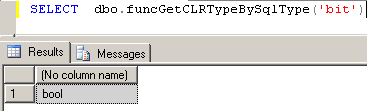
Sample of the usage - nothing hard yet.
A small function just because I want my private variable start from a lower case character

set ANSI_NULLS ON
set QUOTED_IDENTIFIER ON
go

CREATE FUNCTION [dbo].[lowerCaseFirstCharacter]
(@Input [nvarchar] (200))
RETURNS [varchar](200)
WITH EXECUTE AS CALLER
AS
BEGIN
declare @Result varchar(200)
declare @Len int
SET @Len = LEN(@Input)
SET @Result = LOWER(SUBSTRING(@Input, 1, 1)) + SUBSTRING(@Input, 2, @Len-1)

RETURN @Result
END

And, finally, the stored procedure that generates some C# code:

IF  EXISTS (SELECT * FROM sys.objects 
WHERE object_id = OBJECT_ID(N'[dbo].[procUtils_GenerateClass]') AND type in (N'P', N'PC'))
DROP PROCEDURE [dbo].[procUtils_GenerateClass]
GO
/****** Object: StoredProcedure [dbo].[procUtils_GenerateClass]
Script Date: 03/20/2010 13:10:40 ******/
SET ANSI_NULLS ON
GO
SET QUOTED_IDENTIFIER ON
GO
CREATE PROCEDURE [dbo].[procUtils_GenerateClass]
@TableName [varchar](50)
WITH EXECUTE AS CALLER
AS
BEGIN -- proc start
SET NOCOUNT ON;
DECLARE @DbName nvarchar(200 )
select @DbName = DB_NAME()
declare @strCode nvarchar(max)
set @strCode = ''

BEGIN TRY --begin try
set @strCode = @strCode + 'namespace ' + @DbName + '.Gen' + CHAR(13) + '{' + CHAR(13)
set @strCode = @strCode + CHAR(9) + 'public class ' + @TableName + CHAR(13) + CHAR(9) + '{ ' + CHAR(13)

DECLARE @ColNames TABLE
(
Number [int] IDENTITY(1,1), --Auto incrementing Identity column
ColName [varchar](300) , --The string value ,
DataType varchar(50) , --the datatype
IS_NULLABLE nvarchar(5) , --should we add =null in front
CHARACTER_MAXIMUM_LENGTH INT
)
--Decalre a variable to remember the position of the current delimiter
DECLARE @CurrentDelimiterPositionVar INT
DECLARE @PkColName varchar(200)
set @PkColName = ''
declare @ColumnName varchar(200)
--Decalre a variable to remember the number of rows in the table
DECLARE @Count INT

INSERT INTO @ColNames
SELECT column_name , Data_type , IS_NULLABLE , CHARACTER_MAXIMUM_LENGTH
from INFORMATION_SCHEMA.COLUMNS
where TABLE_NAME=@TableName
--Initialize the looper variable
SET @CurrentDelimiterPositionVar = 1
--Determine the number of rows in the Table
SELECT @Count=max(Number) from @ColNames
--A variable to hold the currently selected value from the table
DECLARE @ColName varchar(300);
DECLARE @DataType varchar(50)
DECLARE @IS_NULLABLE VARCHAR(5)
DECLARE @CHARACTER_MAXIMUM_LENGTH INT
--Loop through until all row processing is done
WHILE @CurrentDelimiterPositionVar <= @Count --1st loop
BEGIN
--Load current value from the Table
SELECT @ColName = ColName FROM @ColNames
WHERE Number = @CurrentDelimiterPositionVar
SELECT @DataType = DataType FROM @ColNames
WHERE Number = @CurrentDelimiterPositionVar
SELECT @IS_NULLABLE = IS_NULLABLE FROM @ColNames
WHERE Number = @CurrentDelimiterPositionVar
SELECT @CHARACTER_MAXIMUM_LENGTH = CHARACTER_MAXIMUM_LENGTH FROM @ColNames
WHERE Number = @CurrentDelimiterPositionVar
-- get the C# type based on the passed sqlType, )( needs the DbVsCSharpTypes table )
set @DataType =( SELECT dbo.funcGetCLRTypeBySqlType(@DataType) )
IF @IS_NULLABLE = 'YES'
set @DataType = @DataType + '?'
DECLARE @varPrivate nvarchar(200)
set @varPrivate = '_' + dbo.lowerCaseFirstCharacter(@ColName)

--GENERATE THE PRIVATE MEMBER
SET @StrCode = @strCode + CHAR(9)+ CHAR(9) + 'private ' + @DataType + ' ' + @varPrivate + ';' + CHAR(13) + CHAR(13)
-- GENERATE THE PUBLIC MEMBER
SET @StrCode = @strCode + CHAR(9)+ CHAR(9) + 'public ' + @DataType + ' ' + @ColName + CHAR(13) + CHAR(9)+ CHAR(9) + '{' + CHAR(13)
SET @StrCode = @strCode + CHAR(9) + CHAR(9) + CHAR(9) + 'get { return ' + @varPrivate + ' } ' + CHAR(13)
SET @strCode = @strCode + CHAR(9) + CHAR(9) + CHAR(9) + 'set { ' + @varPrivate +' = value ; }' + CHAR(13)
SET @strCode = @strCode + CHAR(9) + CHAR(9) + '}' + CHAR(13)

if @CurrentDelimiterPositionVar != @Count
SET @StrCode = @StrCode + ''
IF @DataType != 'timestamp'

set @strCode = @strCode + char(13)
SET @CurrentDelimiterPositionVar = @CurrentDelimiterPositionVar + 1;
END
set @strCode = + @strCode + char(9) + ' } //class ' + @TableName + CHAR(13)
set @strCode = + @strCode + ' } //namespace ' + CHAR(13)

PRINT @strCode
END TRY
BEGIN CATCH
print ' Error number: ' + CAST(ERROR_NUMBER() AS varchar(100)) +
'Error message: ' + ERROR_MESSAGE() + 'Error severity: ' +
CAST(ERROR_SEVERITY() AS varCHAR(9)) +
'Error state: ' + CAST(ERROR_STATE() AS varchar(100)) +
'XACT_STATE: ' + CAST(XACT_STATE() AS varchar(100))
END CATCH
END --procedure end
/* Generates a C# class base on DataType conversion*/
GO

Here's a test table I used to check the results:

Here's the stored procedure output sample:

References

How can I programatically convert SQL data-types to .Net data-types?

how-to generate classes based on tables in ms sql 2008

Function to get the C# type based on the tsql type

by . Also posted on my website

Friday, November 11, 2011

Understanding Git, GitHub and GitExtensions - Part I.

At this stage I would like learn how to use the GitHub.

GitHub - Social Coding

This is useful in case I want to make my code accessible to anyone over the Internet. Let's say I want to show someone the example of my work. I create a GitHub account, use Git as my code repository and somehow synchronise it with GitHub. Then any other person will be able to "get the latest version" (or should I say "pull"?) of my code via GitHub. Okay, I just summed up all my knowledge about Git and GitHub until today.

My goal is to be able to commit and update a Visual Studio project, so I looked and found out that everyone recommends GitExtensions.

Git Extensions

This tool allows to control Git without the command line (a handy thing for a long-time Windows user like me!), works well under Windows and has a plugin for Visual Studio. So far, sounds like a perfect tool for my purposes.

The first thing I did was created a GitHub account.

And created a new repository

Next, I installed the GitExtension using default settings, briefly checked the 58-page manual and started the gui. The program automatically checks my settings on startup and it looks all was good - I just had to create a username for myself.

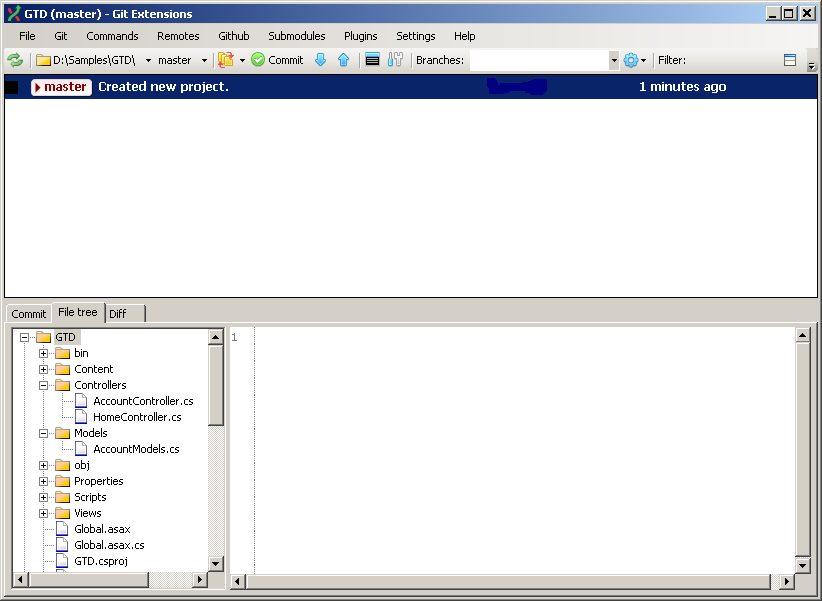
Looked around a little bit and found how to start the Git gui, then look at my repository.

Found out how to check the items in. Go a rather scary message but decided to ignore it for now and see if it affects anything later.

For now it looks like my files are in. Next time, I will explore the checking in and out.

by . Also posted on my website

Wednesday, November 9, 2011

Flash in WPF Application the MVVM way (the easy part)

Now I have to use my WFPFlashLibrary I created in the last post in my main WPF view. I have to add the namespace for the project that contains my Flash control.

xmlns:Flash="clr-namespace:WPFFlashLibrary;assembly=WPFFlashLibrary"

I place my control in the WPF markup and bind Movie and Play.

<Grid>
<Flash:FlashControl Width="400" Height="400" Movie="{Binding Movie,UpdateSourceTrigger=PropertyChanged}" Play="{Binding Play,UpdateSourceTrigger=PropertyChanged}" />
</Grid>

This is the sample code which should be placed in the view. The Init will contain any code that needs to run on the ViewModel creation and will return the instance of the ViewModel. The PlayFlash will be then called right in the constructor of the view for simplicity, but of course it does not have to be there - it can be triggered whenever necessary.

public partial class TestFlashView : System.Windows.Controls.UserControl
{
public TestFlash(IUnityContainer container)
{
InitializeComponent();

DataContext = container.Resolve().Init(container);
(DataContext as TestFlashViewModel).PlayFlash();
}
}

And this is the implementation of the ViewModel. As soon as the PlayFlash() assigns values to the Movie and Play, the control will play the Flash animation (assuming the file is in the specified location!).

public class TestFlashViewModel : ViewModelBase
{
public TestFlashViewModel(IUnityContainer container):base(container)
{

}

virtual public TestFlashViewModel Init(IUnityContainer container)
{
//initialization - login etc.
return this;
}

//*****************************************************************************************

#region properties

string _movie;
public string Movie
{
get { return _movie; }
set { OnPropertyChanged(ref _movie , value,"Movie"); }
}

bool _play;
public bool Play
{
get { return _play; }
set { OnPropertyChanged(ref _play, value, "Play"); }
}

#endregion

public void PlayFlash()
{
Movie = @"c:\flash\flash.swf";
Play = true;
}
}

And that's the end of my small investigation. Unfortunately I found out that the plans have changed, the scope has been reduced and the flash movie is not required any longer. So I won't play with this control for anymore for now and move on to other things. Still was worth the effort.

by . Also posted on my website

Thursday, November 3, 2011

Flash in WPF Application the MVVM way (the hard part)

The Flash ActiveX control can not be added directly to the XAML file. Okay, the solution is well-known - just like with the Windows Forms control, you can use WindowsFormsHost to, well, host it - that's what the host is for. Then we add some code to the code-behind to load the movie and play it, and everything works. Right? Sort of. What if I'm trying my best to do the things the MVVM way? My code-behind file is usually empty, and all the business logic happens in the ViewModel. My XAML file does not have any button1_click event handlers, but rather is linked to the ViewModel by binding and is notified when something changes by means of OnPropertyChanged. What to do? The hard part is to come up with something that can be placed into the XAML file. The easy part is to place that something into the XAML file and bind it to the ViewModel. I'll start with the hard part, and use Visual Studio 2010.

Let's assume that the user controls are in a separate project. So I create a new project using the "WPF User Control Library" template and call it WPFControlLibrary. Let's delete UserControl1.xaml so it doesn't get in the way. First I'll add references to the COM components I may need.

Now I add a User Control (not the User Control - WPF yet!) and call it FlashWrapper. I add the AxShockwaveFlash control to it and call it axShockwafeFlash. For now let's worry only about loading and playing a movie. That's all the code I'll need:

using System.Windows.Forms;

namespace WPFControlLibrary
{
public partial class FlashWrapper : UserControl
{
public FlashWrapper()
{
InitializeComponent();
}

public void LoadMovie(string movie)
{
axShockwaveFlash.Movie = movie;
}

public void Play()
{
axShockwaveFlash.Play();
}

public void Stop()
{
axShockwaveFlash.Stop();
}
}
}

Now is the time to add the User Control - WPF. I call it FlashWPF.xaml. The XAML file is where the WindowsFormsHost comes to play - here I will host my FlashWrapper. Don't forget to add a reference to WindowsFormsIntegration!

<UserControl x:Class="WPFControlLibrary.FlashWPF"
xmlns="http://schemas.microsoft.com/winfx/2006/xaml/presentation"
xmlns:x="http://schemas.microsoft.com/winfx/2006/xaml"
xmlns:mc="http://schemas.openxmlformats.org/markup-compatibility/2006"
xmlns:d="http://schemas.microsoft.com/expression/blend/2008"
xmlns:local="clr-namespace:WPFControlLibrary"
mc:Ignorable="d"
d:DesignHeight="300" d:DesignWidth="300">
<Grid >
<WindowsFormsHost >
<WindowsFormsHost.Child>
<local:FlashWrapper x:Name="FlashPlayer" />
</WindowsFormsHost.Child>
</WindowsFormsHost>
</Grid>
</UserControl>

And still not much of C# code yet.

using System.Windows.Controls;

namespace WPFControlLibrary
{
public partial class FlashWPF : UserControl
{
public FlashWPF()
{
InitializeComponent();
}

public void LoadMovie(string movie)
{
FlashPlayer.LoadMovie(movie);
}

public void Play(bool value)
{
if (value)
FlashPlayer.Play();
else
FlashPlayer.Stop();
}
}
}

Last, and the most complex and cryptic step is to add a custom control. This will be a link between the MVVM application and the WPF control which hosts the wrapper which wraps the ActiveX control.

This is the ViewModel.
That is bound to the WPF custom control.
That hosts the C# wrapper.
That wraps the ActiveX control.
That plays the movie.

I think I got carried away a bit.

Ok, let's add a Custom Control - WPF and call it FlashControl. That's how it looks if all was done correctly:

public class FlashControl : Control
{
static FlashControl()
{
DefaultStyleKeyProperty.OverrideMetadata(typeof(FlashControl), new FrameworkPropertyMetadata(typeof(FlashControl)));
}
}

I have to modify it to expose three DependencyProperties: Movie, Play, and finally itself so it can be created in the MVVM application. And this is the end result:

public class FlashControl : Control
{
static FlashControl()
{
DefaultStyleKeyProperty.OverrideMetadata(typeof(FlashControl), new FrameworkPropertyMetadata(typeof(FlashControl)));
}

public FlashControl()
{
FlashPlayer = new FlashWPF();
}

//*****************************************************************************************

//Movie property definition

public static readonly DependencyProperty MovieProperty = DependencyProperty.RegisterAttached("Movie", typeof(string), typeof(FlashControl), new PropertyMetadata(MovieChanged));

private static void MovieChanged(DependencyObject d, DependencyPropertyChangedEventArgs e)
{
(d as FlashControl).Movie = (string)e.NewValue;
}

//Play movie property definition
public static readonly DependencyProperty PlayProperty = DependencyProperty.RegisterAttached("Play", typeof(bool), typeof(FlashControl), new PropertyMetadata(PlayChanged));

private static void PlayChanged(DependencyObject d, DependencyPropertyChangedEventArgs e)
{
(d as FlashControl).Play = (bool)e.NewValue;
}

//Flash player WindowFormHost
public static readonly DependencyProperty FlashPlayerProperty = DependencyProperty.RegisterAttached("FlashPlayer", typeof(FlashWPF), typeof(FlashControl), new PropertyMetadata(FlashPlayerChanged));

private static void FlashPlayerChanged(DependencyObject d, DependencyPropertyChangedEventArgs e)
{
(d as FlashControl).FlashPlayer = (FlashWPF)e.NewValue;
}

//*****************************************************************************************

public string Movie
{
get { return (string)this.GetValue(MovieProperty); }
set
{
this.SetValue(MovieProperty, value);
FlashPlayer.LoadMovie(value);
}
}

public bool Play
{
get { return (bool)this.GetValue(PlayProperty); }
set
{
this.SetValue(PlayProperty, value);
FlashPlayer.Play(value);
}
}

public FlashWPF FlashPlayer
{
get { return (FlashWPF)this.GetValue(FlashPlayerProperty); }
set { this.SetValue(FlashPlayerProperty, value); }
}
}

And the XAML file (which is for some reason called Generic.xaml and also when I tried to rename it I started getting errors, so I decided to leave the name alone) - I modified it slightly, but that's a matter of personal preference:

<ResourceDictionary
xmlns="http://schemas.microsoft.com/winfx/2006/xaml/presentation"
xmlns:x="http://schemas.microsoft.com/winfx/2006/xaml"
xmlns:local="clr-namespace:WPFControlLibrary">
<Style TargetType="{x:Type local:FlashControl}">
<Setter Property="Template">
<Setter.Value>
<ControlTemplate TargetType="{x:Type local:FlashControl}">
<Grid HorizontalAlignment="Stretch" VerticalAlignment="Stretch">
<ContentControl Content="{TemplateBinding FlashPlayer}" />
</Grid>
</ControlTemplate>
</Setter.Value>
</Setter>
</Style>
</ResourceDictionary>

And the hard part is over!

by . Also posted on my website

Small Things Learned Today

While writing the previous post, I had to find out how to show the special HTML characters, like &nbsp;

Because if I just type &nbsp; I will only see the space. The browser will automatically convert the &nbsp; to space, the &amp; to an ampersand and so on. But I wanted to display exactly what I had in my XML.

So, to display &nbsp; just as it is, I have to type &amp;nbsp; in my post. &amp; gets converted to ampersand and the nbsp; part is just displayed as it is.

What did I type to display &amp;nbsp; in the line above? Well, &amp;amp;nbsp; of course. I'd better stop here before I confuse myself and everyone else.

by . Also posted on my website

Wednesday, November 2, 2011

A Confusing Issue with the Ampersand in the XML Sent to Printer.

Everyone knows that some symbols such as <, >, &, " "break" the XML. That's why Server.HtmlEncode is used to replace them with correct HTML code, like &amp; for the ampersand and so on. After that replacement the XML is supposed to be "safe". However, not under every possible condition. One of the applications I work on prints barcodes on tickets. The number is encoded using Interleaved 2 of 5 format. The encoding is performed by a function provided by the company IDAutomation and the output generally looks like this: "Ë'Zj`!/ÉI?!&!Ì". The output is then passed through the Server.HtmlEncode and added to the XML, which is fed to a printer.

However, yesterday I received a bug report and the error essentially boiled down to

Type : System.Xml.XmlException, System.Xml, Version=2.0.0.0, Culture=neutral, PublicKeyToken=blah Message : An error occurred while parsing EntityName. Line 1, position 2832.
Source : System.Xml
Help link :
LineNumber : 1
LinePosition : 2832
SourceUri :
Data : System.Collections.ListDictionaryInternal
TargetSite : Void Throw(System.Exception)
Stack Trace : at System.Xml.XmlTextReaderImpl.Throw(Exception e)
at System.Xml.XmlTextReaderImpl.Throw(String res, String arg)
at System.Xml.XmlTextReaderImpl.Throw(String res)
at System.Xml.XmlTextReaderImpl.ParseEntityName()
at System.Xml.XmlTextReaderImpl.ParseEntityReference()
at System.Xml.XmlTextReaderImpl.Read()
at System.Xml.XmlLoader.LoadNode(Boolean skipOverWhitespace)
at System.Xml.XmlLoader.LoadDocSequence(XmlDocument parentDoc)
at System.Xml.XmlLoader.Load(XmlDocument doc, XmlReader reader, Boolean preserveWhitespace)
at System.Xml.XmlDocument.Load(XmlReader reader)
at System.Xml.XmlDocument.LoadXml(String xml)
at PrintController.AddDoc(String xmlString)

And, fortunately, I got two XML samples, one of those was causing an error, and the other one was not.

This bit in the encoded XML did not cause any problems:

<text x="centre" y="620" font="IDAutomationHI25L" size="20" bold="false" italic="false" underline="false">
&#203;'Zj`!/&#201;I5!'!&#204;</text>

This one, however, did, regardless of the "safely encoded" ampersand

<text x="centre" y="620" font="IDAutomationHI25L" size="20" bold="false" italic="false" underline="false">
&#203;'Zj`!/&#201;I?!&amp;!&#204;</text>

Solution? I had to think about it and that's what I came up with.

xmlData = xmlData.Replace("barcode", Server.HtmlEncode(mybarcode).Replace("&amp;", "&#038;"))

Because "&#038;" is the HTML ASCII value for "&". And it worked like a charm. Now I just need to convert it to a small function instead which takes care of all "strange" characters: <, >, & and "

References

Server.HTMLEncode Method

HTML ASCII Characters

by . Also posted on my website

Tuesday, October 25, 2011

Setting up a Composite WPF Application Properly.

It's time to step back from working on bits and pieces of something large and remind myself how to create a MVVM project from scratch. There are probably templates available now but I'll start with an empty C# WPF project and call it MVVM for simplicity. Renamed MainWindow to Shell everywhere in the solution because Shell is the conventional name for a top-level window in the application built in the Composite Application Library.

Composite Application Library displays and hides controls through the use of Regions. Several controls can be displayed as regions, one of them is ItemsControl.

An attached property RegionManager.RegionName indicates which region is associated with the control. So, in the Shell.xaml I replaced the Grid element with the ItemsControl element:

<ItemsControl Name="MainRegion" cal:RegionManager.RegionName="MainRegion"/>

For the code to compile, the following line has to be added to the Window tag

xmlns:cal="http://www.codeplex.com/CompositeWPF"

and the Microsoft.Practices.Prism dll has to be referenced in the project which contains the definition of RegionManager.RegionName

The bootstrapper initializes the application build using the Composite Application Library. At this point the bootstrapper only returns the new instance of a Shell class. Added the Bootstrapper class to the solution:

class Bootstrapper : UnityBootstrapper
{
protected override DependencyObject CreateShell()
{
return this.Container.Resolve();
}

protected override void InitializeShell()
{
base.InitializeShell();

App.Current.MainWindow = (Window)this.Shell;
App.Current.MainWindow.Show();
}

protected override void ConfigureModuleCatalog()
{
}
}

At this point, the reference to Microsoft.Practices.Prism.UnityExtensions is required (for UnityBootstrapper). And not to forget the

using Microsoft.Practices.Unity;

otherwise the container would not resolve! Basically, Container.Resolve constructs an instance of the concrete class, resolving any dependencies that it has.

Now the bootstrapper has to run when the application starts. To achieve this, the Startup event of the application is handled in the App.xaml.cs file.

public partial class App : Application
{
protected override void OnStartup(StartupEventArgs e)
{
base.OnStartup(e);
Bootstrapper bootstrapper = new Bootstrapper();
bootstrapper.Run();
}
}

And since the instance of the Shell is manually created by the bootstrapper, the StartupUri attribute is not needed anymore in the App.xaml Application tag.

<Application x:Class="MVVM.App"
xmlns="http://schemas.microsoft.com/winfx/2006/xaml/presentation"
xmlns:x="http://schemas.microsoft.com/winfx/2006/xaml">
<Application.Resources>

</Application.Resources>
</Application>

The application is fully functional now!

References:

WPF Hands-On Lab: Getting Started with the Composite Application Library

What does this mean in Prism/Unity: Container.Resolve()

UnityBootstrapper Class

Bootstrapper

by . Also posted on my website